Computer Network Application Layer
Computer Network Application Layer
DNS (Domain Name System)
DNS uses port 53 to communicate, and can be implemented by both TCP and UDP. (Usaully UDP)
Except when:
- Secondary name server syncs with primary servers,
- The result returned from server is too long (, and thus truncated to 512 bytes, usaully),
- Now some clients support receiving more than 512B data,
it uses TCP.
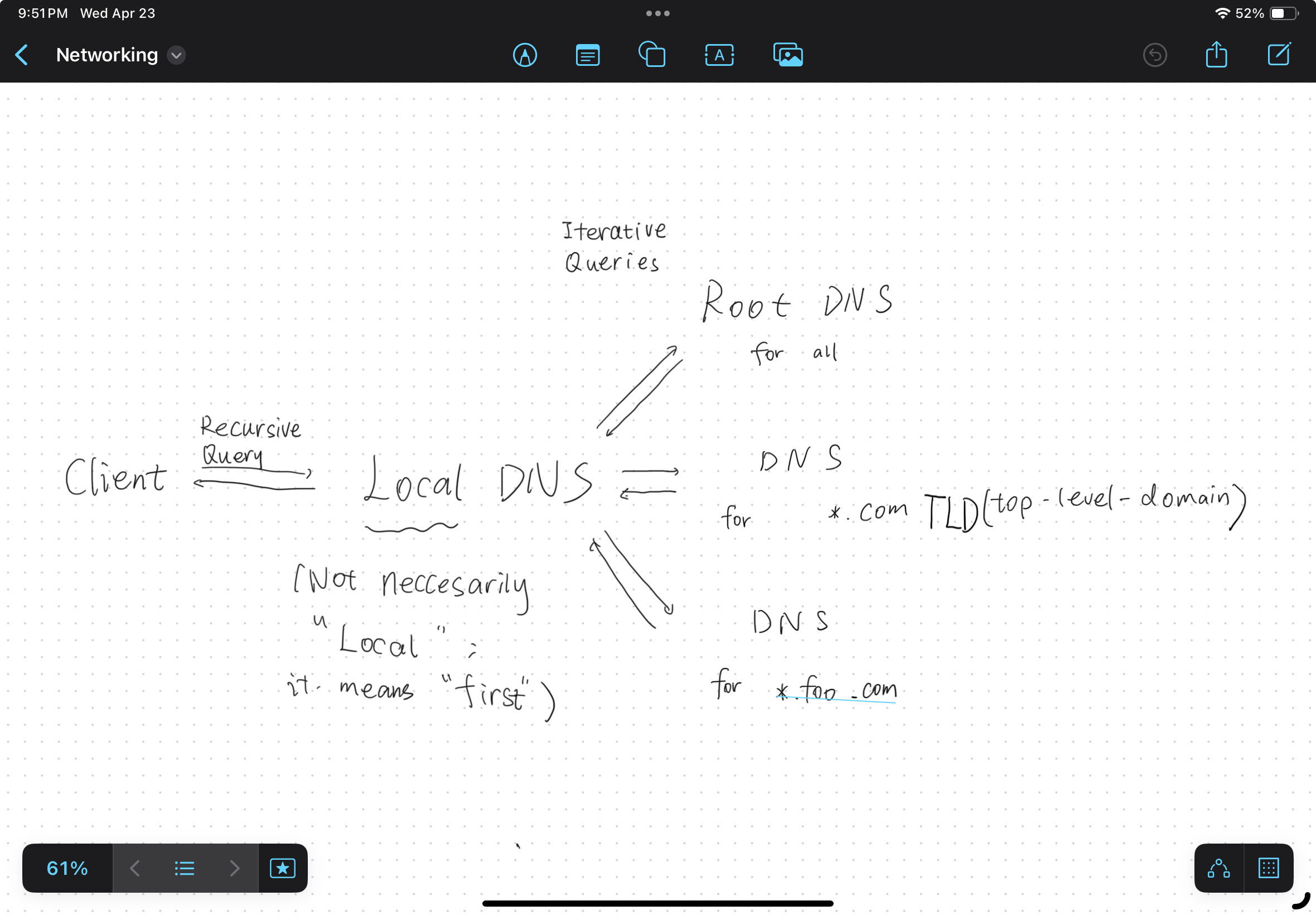
DNS resolvers are classified by a variety of query methods, such as recursive, non-recursive, and iterative.
- Local machine queries local name server by recursive query.
- Local name server queries authoritative name server by iterative query.
It works as shown below.
DNS Resource Record (RR)
Format: <name, TTL, class, type, value>
where
nameis domain name.TTLis time to live. Every hop decrease TTL by 1.classis internet class, whose value can only be 0b0001 (Internet).typeis the type of RR, which has following possible values:- A - Address
- NS - Name server
- CNAME - Canonical name (alias of name)
- MX - Mail server name
- PTR - Pointer (for reverse queries)
- SOA - Gerneral info of DNS server, which is usaully the first record among servers
valueis the value of the record.
HTTP (HyperText Transfer Protocol)
HTTP has following features:
- Stateless, as it doesn’t remember what it did.
- Text-based.
Overview of HTTP versions
- HTTP/1.0
- No pipelining: Must receive ACK for the current request before sending the next, acts like a stop-wait protocol.
- Non-persistent connection: Disconnects after sending/receiving one message.
- HTTP/1.1
- Pipelining: Allows sending subsequent requests without waiting for server ACKs. This reduce the impact of “stop-wait”, but still may cause head-of-line blocking issues.
- Persistent connection: Supports long-lived connections, reducing reconnect overhead.
- HTTP/2.0
- Multiplexing: Parallel request/response transmission, eliminating head-of-line blocking issues from HTTP 1.x.
- HTTP/3.0
- Based on QUIC: Improves performance with lower latency.
HTTP message format
Request format
1
2
3
4
5
6
<method> <request-target> <protocol>
<header-field-name-1>: <value-1>
...
<header-field-name-n>: <value-n>
<CRLF>
<body>
Response format
1
2
3
4
5
6
<protocol> <status-code> <status-text>
<header-field-name-1>: <value-1>
...
<header-field-name-n>: <value-n>
<CRLF>
<body>
Where:
<method>typically can bePOSTGETPUTDELETEand so on.<request-target>is a URL to uniquely identify a resource.<protocol>is http version.<CRLF>means carriage return and line feed.
FTP (File Transfer Protocol)
For controlling connection, it uses TCP port 21.
FTP may run in active or passive mode, which determines how the data connection is established.
- In active mode, the client starts listening for incoming data connections from the server on port M. It sends the FTP command PORT M to inform the server on which port it is listening. The server then initiates a data channel to the client from its port 20, the FTP server data port.
- In situations where the client is behind a firewall and unable to accept incoming TCP connections, passive mode may be used. In this mode, the client uses the control connection to send a PASV command to the server and then receives a server IP address and server port number from the server, which the client then uses to open a data connection from an arbitrary client port to the server IP address and server port number received.
Examples of FTP commands:
PORT x,y,z,w,p,q
In this example, the server sets up a connection to x.y.z.w:p*256+q .
Trivial File Transfer Protocol (TFTP)
A kind of Stop and Wait protocol.
ASCII and Binary.
Simple Mail Transport Protocol (SMTP)
Sending.
Only accepts ASCII Text.
Port 25.
Post Office Protocol 3 (POP3)
Receiving.
TCP port 110.
POP3S uses TCP port 995.
Internet Message Access Procol (IMAP)
Receiving.
Port .
This post is licensed under CC BY 4.0 by the author.